

The Open UAS course offering can be found in Sisu, where you can also register for studies.
To see the full range of courses offered by the Open UAS, enter three special characters in the search field (e.g. ''' or ***) and click search. You can filter the search results using various filters.
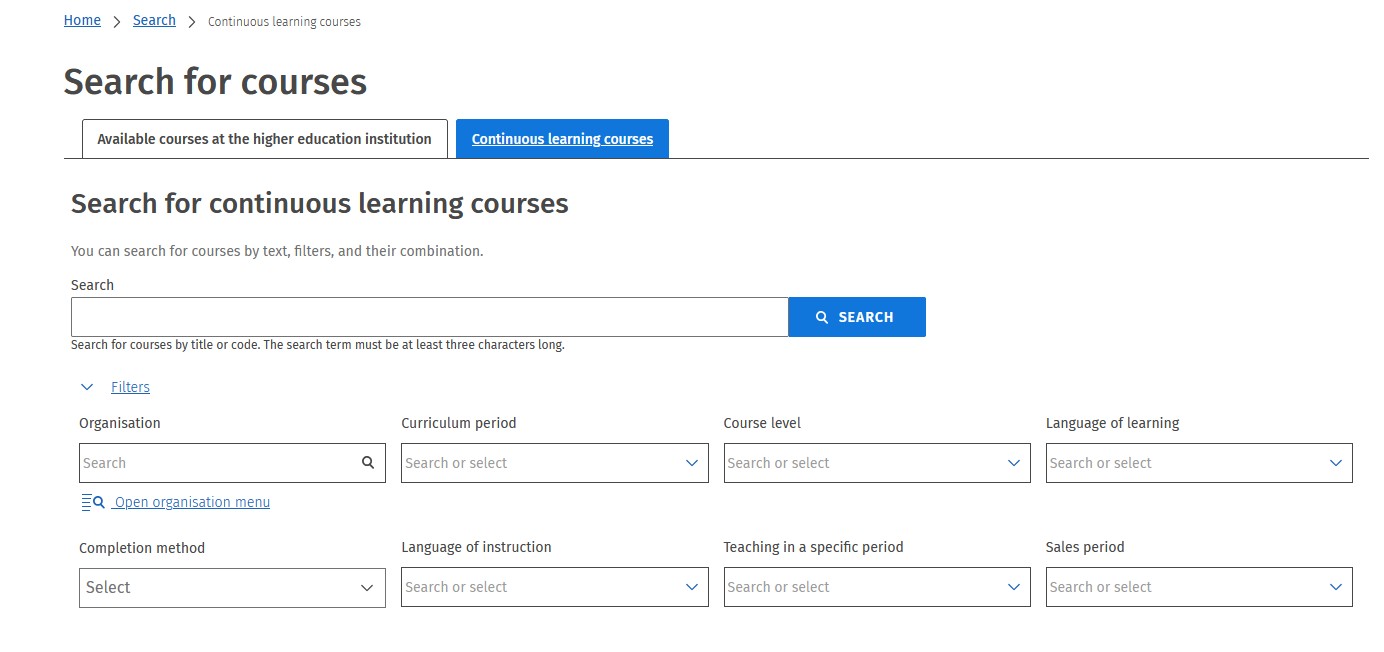
Field-specific search
You can find courses in a specific subject area by selecting the desired option in the Organisation field:
- Faculty of Health Care and Social Services (LAB)
- Faculty of Business and Hospitality Management (LAB)
- Institute of Design and Fine Arts (LAB)
- Faculty of Technology (LAB)
- Language center (LAB)
Search by level of study
You can also filter your search by the level of studies by selecting an option in the Course level field:
- Professional studies (=bachelor-level studies)
- Advanced professional studies (=master-level studies)
Search by language
You can search for courses taught in a specific language by using the Language of instruction field.
All course registrations are handled through Sisu. To register for an Open UAS course, follow these steps:
- Choose your course
Browse available courses and add your selection to the shopping cart in Sisu. - Pay the course fee
Complete the payment to confirm your place. - Verify your identity
Follow the instructions in Sisu to confirm your identity and finalize your registration.
Choose your course
Step 1: Select Your Course and Add It to the Shopping Cart
- Use the search function in Sisu to find courses by name or filters.
- Click on the course name to open the course information sheet, where you can read the full course description.
- To register, go to the Continuous learning courses tab.
- Select the course and click Add to Shopping Cart.
Step 2: Choose Your Teaching Group
- After adding a course, you’ll be prompted to select your teaching group(s).
- You must choose the group you plan to attend before proceeding to payment.
- Click Continue at the bottom right of the screen.
- On the next page, click Confirm Selections to finalize your choices.
Step 3: Proceed to Payment
- Once your selections are confirmed, you can either continue browsing or go directly to the shopping cart to complete your purchase.
- Note: You have 15 minutes to finalize your payment after confirming your selections.
Pay the course fee
- Please note that the course fee is binding. Once you're ready to proceed, go to your shopping cart to complete the payment.
-
You can pay for multiple courses at once if needed.
Purchaser Information
- Enter the details of the person making the purchase. This can be different from the person attending the course.
Secure Payment
- You’ll be redirected to a secure payment page.
- Follow the on-screen instructions carefully to complete your transaction.
- Once your payment is successful, you’ll receive confirmation emails for both the payment and your order.
Confirm your identity
To complete your registration, the student taking the course must verify their identity.
Electronic Identification
- If you have access to Finnish online banking credentials, you can verify your identity using the Suomi.fi identification service.
- If you have recently studied at LAB University of Applied Sciences and your study right is still active, you can log in to Sisu with your LUT ID to confirm your identity.
If You Cannot Log In
If electronic identification is not possible:
- Contact the Open UAS at avoinyliopisto
 lut [dot] fi (avoinamk[at]lab[dot]fi )
 - Include your verification code, which can be found in the order confirmation email you received after payment.
- Please note: the code is valid for 3 days from the date of purchase.
Once your identity is verified and your registration is confirmed, you will receive an email with instructions on how to begin your course.